Entity Trigger Function
What is Entity Trigger Function ?
In an ongoing chat whenever a user types anything randomly like (email, mobile no, order no etc) then the values are matched with the regex present in the entity and if it matches then we store it in a particular variable , and call the particular function .
Why we use Entity Trigger Function ?
- If a user enters something inside chat then bot might not be that much trained to handle that text. In this case what we can do is we can fire a function that processes this information.
- So instead of giving a none response ( i didn't understand etc. ) we can give a reasonable answer for sharing details. like thankyou or something.
- Also we can collect leads ( user entered mobile no , email , order no etc ) for further use.
How to write Entity Trigger Function?
Entity Trigger Functions are simple functions which are responsible for handling the scenario where the user enters anything randomly like ( email, mobile no, order no etc ) in the chat.
So first we have to write an async function and pass some parameters (lke session_doc, entity, oldEntities, socket, userData, analysisRes etc ).
Next in the try block we have to define a variable to store the user entered data( as per the brand requirement ) like ( email, mobile no, order no. etc ) & check if currently there is any intent going on or not.
After that we should write a condition as per the brand requirement ,like if there is no intent or intent is none and the particular variable has received any value after passing the regex entity or sometimes without checking with any entity(like userEnteredStoreName in Ikea) then we can show some message as per requirement and store the variable into the db.
We store the entity trigger function into the bsv(brand specific value) collection’s “entityPreUpdateFuncs” array with description and variable name(where we have storing the user input value).
Example:-
We are already using the Entity Trigger Functions in some brands like ikea.
- Here we have created a userEnteredStoreName entity trigger function to handle some scenario like if any user enter any store name in the chat then we can show some message with some options.
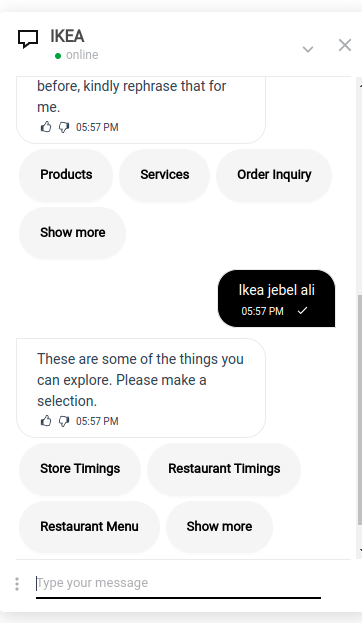
- Here we can see that the user entered the store name Ikea jebel ali and the bot didn't gave any none response like (I didn't understand ) it was giving a message and some options. This thing is handled by the entity trigger function.
Lets see in the Code.
//(Entity trigger function - for ikea store names)
const userEnteredStoreName = async ({ session_doc, entity, oldEntities, socket, userData, analysisRes = null }) => new Promise(async (resolve, reject) => {
   /**
   * This is an entity trigger function, triggers only when a user enters a store name, on entering store name 5faa2f7a8a642a4fc12d42bb msg will be displayed.
   */
   try {
       const userEnteredStore = (oldEntities.userEnteredStore) ? (oldEntities.userEnteredStore) : ''
       const intent = (analysisRes.intentName) ? (analysisRes.intentName) : ''

       if ((intent === 'None' || intent === 'none') && !session_doc.ongoing_intents[0] && userEnteredStore) {
           session_doc = await genAndSendResponse(socket, session_doc, 'response', '5faa2f7a8a642a4fc12d42bb') // These are some of the things you can explore. Please make a selection
       }

       session_doc = await update_entities_in_db_without_check(session_doc, {
           userEnteredStore
       })

       return resolve({ session_doc, oldEntities })
   } catch (err) {
       console.error(err)
       handleAppError({ err })
   }
})
- Here firstly we pass some parameters like session_doc, entity, oldEntities, socket, userData, analysisRes etc in userEnteredStoreName function.
- After that we are declaring a variable userEnteredStore to store the user entered store name from oldEntities.userEnteredStore .
const userEnteredStore = (oldEntities.userEnteredStore) ? (oldEntities.userEnteredStore) : ''
- Then we check if there is any intent already going on or not. After that if the value of the intent is ‘None’ or ‘none’ and there is no intents are going on and the value of the userEnteredStore is set (stores the store name which user enters) then we send a message with buttons (shown in the chatbot image) and save the value of the userEnteredStore variable into the database.
       if ((intent === 'None' || intent === 'none') && !session_doc.ongoing_intents[0] && userEnteredStore) {
           session_doc = await genAndSendResponse(socket, session_doc, 'response', '5faa2f7a8a642a4fc12d42bb') // These are some of the things you can explore. Please make a selection
       }
What to do in DB?
- First we have to connect the particular brand db and create entities as required. If we have to store some data like (order no) then we have to create an entity and store the regex for order no and save the value in particular variable.Whenever any user enters any order no then it will check with the regex and if it matches then it will store the value(user entered order no) into the variable present in the entity.
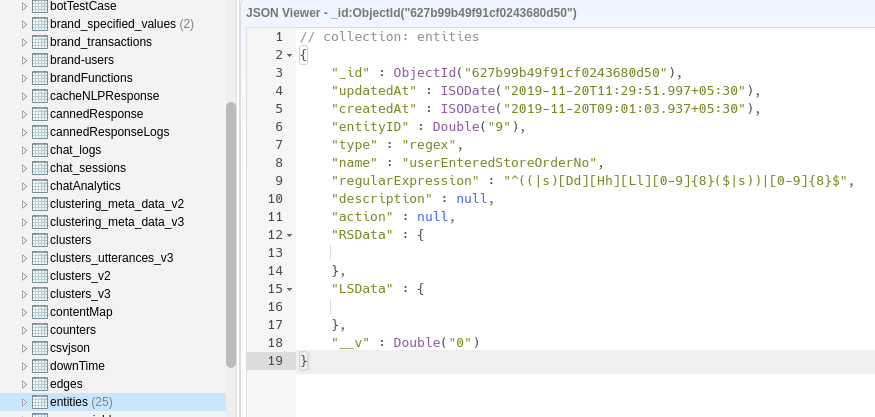
In this example of userEnteredStoreName we don’t need any entity.
- Now next we have to go to the bsv(brand_specific_values) collection.

Then we have to select the document of dev/prod env and we can see there is an array of objects named “entityPreUpdateFuncs” where we have to store our entity trigger function.
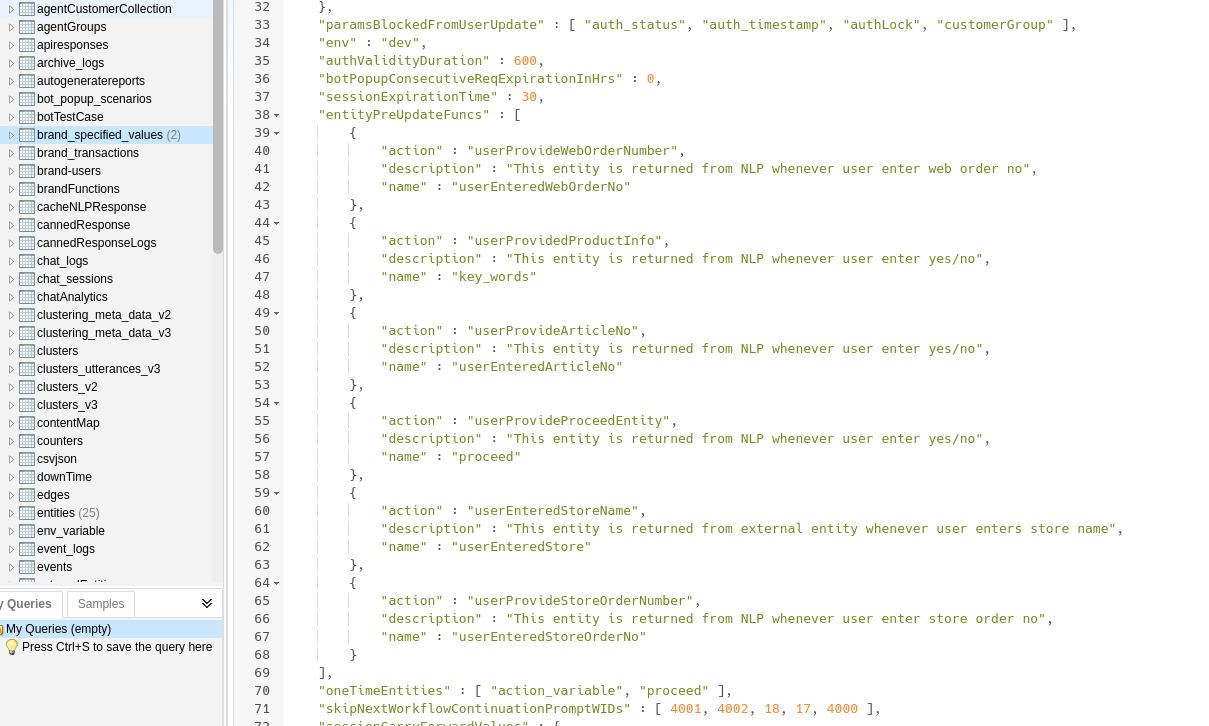
In “entityPreUpdateFuncs” array we can see some objects , they are basically entity trigger functions & in every object we can see three fields-
action
description
name

- In action we have to store the entity trigger function name, in description we have to add the description about the entity trigger function and in name we have to store the variable name where we are storing the user entered value for future use..
- Whenever any user types any random thing in chat(like email, mobile no, order no etc) then first it will match with the regex in the entity. If it matches, then it stores the value into the variable and then the entity trigger function will be triggered.After that we can show any msg according to the user input.